

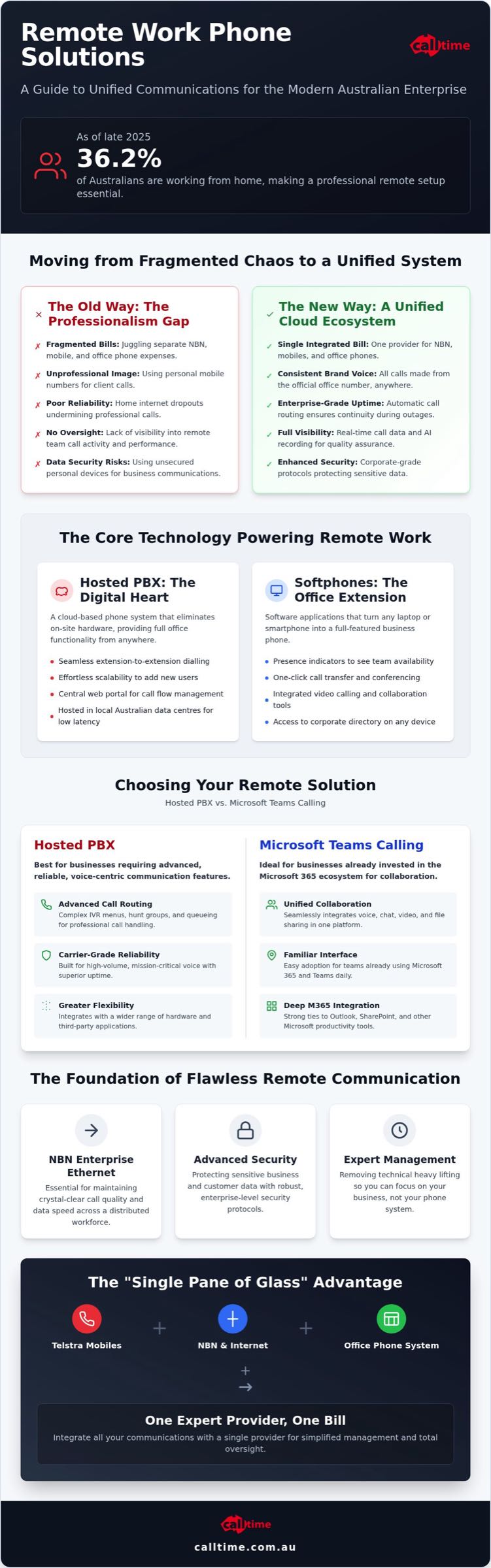
With 36.2% of Australians working from home as of late 2025, the makeshift home office has officially become a permanent business requirement. Most leaders agree that managing a dispersed team is difficult enough without juggling fragmented bills for NBN, mobile, and office phones. You need visibility into call activity and the assurance that your data is secure, yet home internet dropouts often undermine your professional image. This guide to remote work phone solutions Australia delivers a clear path to a unified communication ecosystem.
We’ll show you how to transition your team to a seamless setup using professional-grade tools like Hosted PBX and Microsoft Teams calling. You’ll learn how to integrate your connectivity and security into a single, high-performance engine that removes technical obstacles. We will cover everything from AI call recording to Telstra mobile integration, ensuring your remote infrastructure is reliable, scalable, and simple to manage. Discover how to empower your workforce with a setup that maintains crystal-clear connectivity and enterprise-level security across the country.
Key Takeaways
- Learn how to move beyond fragmented communication by transitioning from personal mobile use to a professional, unified cloud ecosystem.
- Compare the technical advantages of Hosted PBX against Microsoft Teams calling to identify the best remote work phone solutions Australia for your specific operational needs.
- Discover how softphones turn existing laptops and mobiles into powerful office extensions, eliminating the need for costly on-site hardware.
- Understand why NBN Enterprise Ethernet and advanced security protocols are essential for maintaining call quality and protecting data across a distributed workforce.
- Explore the benefits of a “single pane of glass” approach by integrating Telstra mobile plans, NBN, and office phone systems with one expert provider.
What are Remote Work Phone Solutions and Why Does Your Business Need Them?
Remote work is no longer a temporary fix; it’s a strategic pillar for the modern Australian enterprise. A remote work phone solution is a cloud-based system that allows employees to access office telephony features from any location with an internet connection. This goes beyond a simple app on a mobile. It’s a comprehensive ecosystem that links your team through a unified platform. Implementing robust remote work phone solutions Australia ensures your business maintains its professional edge while staff work from the kitchen table or a regional hub. It’s about moving from “making do” with personal devices to a structured, corporate-grade environment.
The Professionalism Gap: Mobile vs. Hosted PBX
Showing a mobile number to a prospective client can feel informal or transient. In the Australian market, a local landline number signals stability and established roots. By using a modern business telephone system, your team can make and receive calls using the office number from any device. This creates a consistent brand voice. Customers don’t need to know where your staff are sitting. They just need to know their call will be answered professionally with an IVR menu or a tailored greeting that reflects your company’s standards. It ensures your brand identity remains intact, regardless of physical location.
Operational Efficiency and Oversight
Managing a remote team requires data, not guesswork. You can’t walk across the office to see who is on a call. A unified cloud system provides real-time visibility into call volumes and staff activity. Features like AI call recording allow managers to review interactions for training and quality assurance, which is vital when you aren’t there to overhear conversations. Transitioning to integrated remote work phone solutions Australia allows for this level of oversight without micromanaging.
It also solves the administrative headache of mobile reimbursements. Instead of chasing dozens of individual receipts, you manage one integrated bill for NBN, mobile, and office lines. This removes the “bill shock” often associated with unmanaged remote expenses. A unified system acts as the silent engine of your operations. If an office NBN connection fails, your Hosted PBX automatically routes calls to staff mobiles or home setups without the caller ever knowing there was a hitch. This level of resilience is what separates a professional outfit from a hobbyist. By integrating Telstra mobile plans and NBN into one managed service, you remove the technical heavy lifting from your daily to-do list.
The Core Technology: Hosted PBX and Softphones
Hosted PBX is the digital heart of modern remote work phone solutions Australia. It eliminates the need for expensive, clunky on-site hardware that requires constant maintenance. You don’t need to worry about cables or server racks. By moving your entire phone system to the cloud, you gain the freedom to operate from anywhere without losing functionality. It just works.
Transitioning to these systems allows for seamless extension-to-extension dialling across the country. Whether your team is in a home office or a co-working space, they can reach a colleague by simply dialling a three or four-digit extension. This keeps the team connected as if they were in the same room. Scalability is equally effortless. You can add new remote users in minutes through a web portal, rather than waiting days for a technician to install physical lines.
How Hosted PBX Functions in a Virtual Environment
Cloud hosting provides the reliability and redundancy that traditional systems lack. For Australian businesses, using local data centres is critical to reducing call latency and ensuring voice quality remains crisp. You can manage complex call flows and hunt groups via a central web portal, giving you total control over how calls are routed. For businesses in regional areas or those requiring high-level continuity, the NBN business satellite service offers an essential layer of backup. This ensures your cloud system stays online even if primary connections falter.
Softphone Features That Empower Remote Staff
Softphones are the software applications that turn a laptop or smartphone into a full-featured office extension. Unlike basic mobile apps, professional softphones bridge the gap between physical desk phones and digital mobility. They offer a suite of tools designed for collaboration:
- Presence indicators: See who is “at their desk,” on a call, or away in real-time.
- Unified Workspace: Integrated chat and file sharing within the phone application.
- Device Flexibility: Seamlessly switch between desktop and mobile apps during a live call.
This flexibility ensures your team stays productive without being tethered to a desk. When you deploy the right remote work phone solutions Australia, you give your staff the tools to perform at their best from any location. If you want to simplify your setup, you can explore Hosted PBX options that integrate your office hardware with remote applications for a truly hybrid workforce.
Comparing Remote Solutions: Hosted PBX vs. Microsoft Teams Calling
Microsoft Teams has transformed the Australian workplace. It’s now the primary hub for millions of professionals. Yet, the “Teams Calling” phenomenon requires a closer look before you commit your entire voice strategy to it. Is it a complete replacement for a traditional phone system? When selecting remote work phone solutions Australia, the choice between a dedicated Hosted PBX and Microsoft Teams calling depends entirely on your operational DNA. One offers granular control; the other offers total consolidation.
When to Choose a Dedicated Hosted PBX
A Hosted PBX is built for businesses that live and breathe external communication. It remains the gold standard for high-volume call environments. If your team manages complex routing, such as time-of-day diversions or multi-level IVR menus, a PBX offers a level of control that Teams often struggles to match in its standard configuration. You get advanced reporting features that allow you to track every second of staff activity. This visibility is vital for maintaining service levels and training remote staff who aren’t in the same room as their supervisors.
Independence is another key factor. While Microsoft is a global giant, relying on one ecosystem for messaging, email, and voice creates a single point of failure. A dedicated Hosted PBX keeps your critical voice lines separate from your productivity software. This redundancy ensures your customers can always reach you, even if your office suite experiences a hiccup. Additionally, for teams that only require basic telephony without the bells and whistles of a full collaboration suite, a Hosted PBX often delivers a much lower cost-per-user. It’s about paying for what you use, not for features that sit idle.
The Case for Microsoft Teams Calling Integration
Microsoft Teams calling is the ideal solution for teams where internal collaboration is as important as external reach. It consolidates everything. Your remote staff don’t have to switch between windows. They can move from a group chat to a video conference and then dial an external mobile number, all within the same application. This reduces “toggle tax” and keeps your team focused on the task at hand. It creates a truly unified workspace that feels the same whether you’re in the office or at home.
Leveraging your existing Microsoft 365 licences is a smart move for many Australian businesses. It simplifies your software stack and makes onboarding remote staff a breeze. Calltime bridges the gap here by providing the underlying SIP Trunking and voice infrastructure. We connect your Teams environment to the public phone network, ensuring high-quality Australian-grade connectivity. This hybrid approach gives you the Teams interface you love with the reliability of a professional telecommunications provider. You get a single, integrated solution that removes the technical heavy lifting, allowing your team to focus on results rather than troubleshooting their tools.
Infrastructure Essentials: NBN, Security, and Hardware
Your phone system’s performance depends entirely on the data pipe it sits on. In the context of remote work phone solutions Australia, a standard residential NBN plan often falls short during peak business hours. For organisations managing multiple sites or a heavy volume of concurrent calls, NBN Enterprise Ethernet is the gold standard. It provides symmetrical upload and download speeds alongside a 99.95% uptime guarantee. This ensures your voice traffic never competes with a household’s streaming habits. It acts as the silent engine that keeps your communications fluid and professional.
Optimising NBN for VoIP Quality
Most managers overlook upload speeds, yet VoIP is a two-way street. If your upload bandwidth is choked by a large file transfer, your voice will drop out or lag during a client call. Implementing Quality of Service (QoS) settings on your router allows you to prioritise voice traffic over less critical data. This ensures a professional conversation remains stable even on a busy home network. Choosing a managed NBN connection from your voice provider simplifies this significantly. It allows for end-to-end monitoring and faster fault resolution because the same team manages both the line and the phone system.
Integrated Security for the Distributed Workforce
Moving your telephony to the cloud introduces risks like toll fraud and unauthorised access. Securing the remote office requires a multi-layered approach. You should use encrypted voice protocols and secure login credentials to shield your data from prying eyes. Modern systems also allow you to integrate office security alerts and CCTV feeds directly into your mobile phone app. This gives you peace of mind that your physical and digital assets are protected simultaneously, regardless of where you are working.
Compliance is equally non-negotiable. If you use AI call recording for training or quality assurance, you must ensure data privacy standards are met across all remote endpoints. Professional-grade remote work phone solutions Australia provide the necessary encryption and access controls to stay compliant. This protects your business from the legal ramifications of data breaches while maintaining the benefits of advanced call analytics. Accuracy matters here.
Finally, consider the physical hardware. Hardware choice matters. While softphones are versatile, some staff prefer the tactile feel of an IP desk phone. Remote-ready models plug directly into a home router and function exactly as if they were in the main office. High-quality noise-cancelling headsets are also essential. They help maintain a professional atmosphere even in a noisy home environment. If you’re ready to build a more resilient infrastructure, get a quote for NBN and Hosted PBX integration to see how we can streamline your setup.
Streamlining Remote Work with Calltime’s Integrated Solutions
Businesses often struggle because their communication stack is a patchwork of different providers. One company handles the NBN, another manages the mobiles, and a third provides the phone system. This fragmentation leads to finger-pointing when technical issues arise. Calltime eliminates this friction by providing a unified ecosystem. As a single-source provider, we deliver remote work phone solutions Australia that integrate every touchpoint into one manageable bill. Whether you need SIP trunking for a complex multi-site setup or a predictive dialler for a remote outbound team, we tailor the infrastructure to fit your specific workflow. This “power of one” approach removes the complexity of managing disparate vendors.
Mobile Fleet Management and Telstra Integration
A distributed workforce is only as effective as its mobile connectivity. By providing staff with Telstra mobile plans that link directly back to your office PBX, you ensure they are always reachable on a professional number. Telstra’s network reach is essential for regional remote workers who may lack reliable fixed-line options. Managing a national team becomes simpler when you can oversee data pools and mobile costs from a central point. This integration ensures that a call to a staff member’s mobile feels like a call to their desk, maintaining that crucial professional boundary. It simplifies your billing and gives you total oversight of your mobile fleet expenses.
Why Calltime is the Silent Engine of Your Success
We act as the silent engine behind your daily operations. Our team handles the technical heavy lifting, monitoring your systems proactively so you don’t have to. If a connection drops or a routing issue occurs, we often identify and resolve it before your staff even notice. This commitment to removing obstacles allows Australian business owners to focus on their core objectives. We offer total flexibility with both Hosted and On-Premise PBX solutions. This means your infrastructure can scale as your team grows, without requiring a complete overhaul of your communication strategy. We bridge the gap between complex technology and user ease.
Planning a transition doesn’t have to be a headache. We specialise in zero-downtime migrations that begin with a thorough audit of your current setup. We identify bottlenecks and security gaps before moving a single line. This methodical approach ensures your team stays connected throughout the entire process. If you are ready to simplify your operations and empower your remote workforce, you can organise a communications health check with Calltime today. We will help you plan a migration that keeps your business running at full speed.
Future-Proof Your Distributed Workforce
Transitioning to a unified communication model is no longer optional for businesses that value professionalism and operational oversight. By integrating Hosted PBX with reliable NBN and mobile infrastructure, you eliminate the fragmentation that slows your team down. The right technology, from softphones to secure cloud routing, turns any location into a high-performance office extension. It’s about creating a seamless environment where your staff can perform at their best without technical friction.
Calltime serves as your expert guide and silent engine throughout this transition. As an Authorised Telstra Partner and NBN Business Grade Provider, we handle the technical heavy lifting so you don’t have to. Our Australian-based expert support team ensures your remote work phone solutions Australia are always optimised for peak performance. We bridge the gap between complex infrastructure and daily ease of use.
Take the first step toward a more resilient setup and Organise a Remote Work Strategy Session with Calltime today. Let’s build a system that empowers your team to succeed from anywhere across the country.
Frequently Asked Questions
Can my staff use their existing home NBN for our remote phone system?
Yes, staff can use their home NBN, but the quality of the connection is a critical factor. Standard residential plans often share bandwidth with other household activities, which can cause jitter or dropouts during calls. For consistent performance with remote work phone solutions Australia, we recommend using a router with Quality of Service (QoS) settings enabled. This prioritises voice traffic over other data, ensuring professional call clarity even on a busy home network.
Is it possible to keep our current business phone numbers when moving to a remote solution?
You can absolutely keep your existing business phone numbers. The process, known as porting, allows you to move your current local and 1300/1800 numbers to a Hosted PBX or SIP Trunking service. We manage the transition with the relevant carriers to ensure there is no disruption to your incoming calls. Once ported, these numbers become accessible to your remote team through their softphones or IP handsets, regardless of their physical location.
How many staff can a Hosted PBX system support?
A Hosted PBX system is highly scalable and can support anywhere from a single user to thousands of employees. Unlike traditional on-premise systems that are limited by physical ports, cloud-based solutions grow with your business. You can add or remove extensions in real-time through a centralised management portal. This flexibility makes it an ideal choice for Australian enterprises that need to scale their remote workforce quickly without investing in new on-site infrastructure.
Do we need to buy new hardware like headsets or IP phones?
New hardware isn’t a strict requirement because softphones turn existing laptops and smartphones into office extensions. However, we recommend investing in professional-grade noise-cancelling headsets to ensure clear communication in home environments. If your staff prefer a traditional desk phone experience, remote-ready IP phones can be pre-configured to work immediately upon being plugged into a home router. The choice depends on your team’s specific workflow and their personal comfort preferences.
What happens to our phone system if the home internet goes down?
If a staff member’s home internet fails, the system uses built-in redundancy to keep them connected. Calls can be automatically diverted to a mobile device using integrated Telstra mobile phone plans or sent to a professional voicemail-to-email service. Because the “brain” of the system lives in the cloud rather than a physical office, your business remains reachable even if individual remote endpoints experience local connectivity issues or power outages.
Is a remote phone system secure against hackers?
Modern remote systems are highly secure when configured with enterprise-grade protocols. We implement end-to-end encryption for voice traffic and multi-factor authentication (MFA) to prevent unauthorised access. Additionally, our integrated security features monitor for unusual patterns that might indicate toll fraud. By using professional remote work phone solutions Australia, you gain a level of protection that far exceeds what is possible with unmanaged personal mobile phones or basic residential setups.
Can I monitor my remote staff’s call activity in real-time?
You can monitor call activity in real-time through a comprehensive web-based dashboard. This allows managers to see who is currently on a call, track average wait times, and view total call volumes across the entire distributed team. Features like AI call recording and live supervisor “whisper” modes provide deep insights into performance and quality assurance. This level of visibility ensures that your team remains productive and maintains high service standards from any location.
How much does it cost to set up a remote work phone solution in Australia?
The cost of a remote phone solution depends on your specific requirements, such as the number of users and the complexity of your call routing. Generally, businesses save money by eliminating expensive on-site hardware maintenance and consolidating separate bills for NBN and mobile services. While we don’t provide fixed pricing here, the shift to a cloud-based model typically offers a more predictable monthly expense compared to legacy systems. It is an investment in operational efficiency.